Unlocking Winter Creativity with the December Kitchen Watercolor Clipart Set
Hello and happy to present a fresh approach to your winter design projects. As we move into the colder months, the demand for cozy, inviting visuals skyrockets. Whether you are a small business owner preparing holiday marketing materials, a blogger crafting seasonal recipes, or a hobbyist making handmade gifts, the right visual assets make all the difference. The December Kitchen Watercolor Clipart Set arrives as a comprehensive solution for these needs, offering a hand-painted aesthetic that feels warm and authentic. However, simply purchasing high-quality art is only half the battle; knowing how to integrate it effectively without falling into common creative traps is where true success lies.
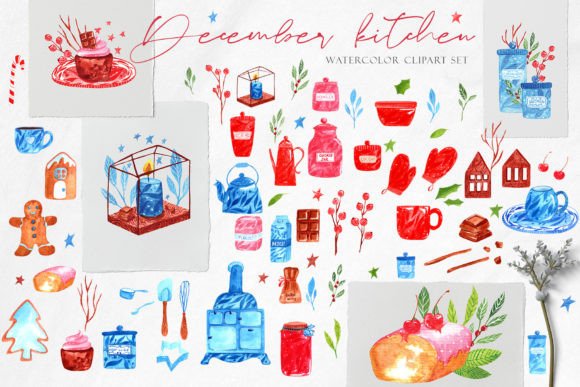
This collection is specifically curated for winter invitations, kitchen decor, craft projects, baking parties, postcards, and even textile applications like aprons. With 12 pre-made compositions and 62 individual elements, including little stars and leaves, it provides immense flexibility. Yet, many creators overlook the technical nuances of such files, leading to frustrating results in print or digital media. Let's explore how to maximize this resource while avoiding pitfalls that often diminish the quality of final products.
Avoiding Resolution Misunderstandings in Print Projects
One of the most frequent mistakes beginners make involves resolution expectations. This set boasts images at 300 DPI, which is the gold standard for professional printing. However, users often resize these images incorrectly within their software, inadvertently lowering the effective resolution before sending files to a printer. If you stretch a small element beyond its original dimensions—approximately 8"x10" for individual items or 11"x12" for compositions—you risk pixelation and blurry edges.
To avoid this, always check the physical dimensions of your canvas before importing assets. If you are designing a large poster or a fabric print, ensure your document setup matches the scale of the clipart. A better approach is to utilize the included PSD file. Since it contains all individual elements on separate layers, you can manipulate them non-destructively within Photoshop or Affinity Photo. This preserves the crisp, hand-painted texture that defines the collection's charm. Remember, high-resolution files are only as good as the workflow protecting them.
Navigating File Formats for Different Applications
Another area where confusion often arises is the choice between PNG and JPEG formats. This collection thoughtfully includes both: five patterns in JPEG with white backgrounds and five in transparent PNG, alongside the individual transparent elements. A common error is using the JPEG versions for overlay projects, such as placing a pattern onto a colored t-shirt mockup or a dark-themed web banner. The white background in JPEGs creates an unsightly box around the design, ruining the seamless look.
For any project requiring layering—like DIY planner stickers, greeting cards, or web designs—always reach for the transparent background PNG files. These allow the watercolor textures to blend naturally with your underlying colors. Conversely, if you are working in Microsoft Word or PowerPoint for a quick flyer where transparency isn't supported well, the JPEG patterns with white backgrounds might actually save you time. Understanding the specific strengths of each format ensures you aren't fighting against your tools but working with them efficiently.
Maximizing Versatility Without Overcrowding Designs
The ability to combine any elements of the set to create unique compositions is a powerful feature, but it invites the temptation of over-designing. Because the set includes 62 individual elements plus 12 full compositions, there is a risk of cluttering your layout with too many stars, leaves, and kitchen motifs. When every inch of a baking party invitation is filled with watercolor details, the essential information—like date, time, and location—can get lost.
A more balanced approach involves using the pre-made compositions as anchors or background watermarks at reduced opacity, then selecting just one or two individual elements to highlight key text. For instance, when creating a kitchen apron design, place a single large composition centrally and use the smaller leaves as subtle accents near the hem. This creates visual hierarchy and maintains the elegant, hand-painted feel without overwhelming the viewer. Less is often more when dealing with rich, textured artwork.
Ensuring Compatibility Across Your Software Stack
While this set is compatible with major editors like Photoshop, Procreate, Affinity Designer, and Canva, users sometimes assume "compatible" means "identical experience." Importing complex PSD files into simpler apps like Canva or Microsoft Word can sometimes flatten layers or alter color profiles slightly. If you encounter issues where colors look duller than expected, check your color mode settings. Print projects should ideally be in CMYK, while digital screens use RGB. Although these files are versatile, converting them correctly for your specific output medium is crucial for color accuracy.
If you are using Procreate on an iPad, take advantage of the separate layers in the PSD to animate your designs or create time-lapse videos of your process—a great tactic for social media marketing. For those using Adobe Illustrator, remember that while you can place these raster images, they cannot be vectorized automatically without losing the watercolor texture. Embrace the raster nature of the files rather than trying to force them into vector workflows.
Final Checks Before You Create
Before diving into your next project, take a moment to review the file information provided. You have access to high-resolution assets perfect for everything from wrapping paper to stationery. Ensure you have downloaded the full package, including the pattern files and the master PSD. If you plan to use these for commercial products like t-shirts or textiles, verify the licensing terms regarding print runs.
By respecting the resolution limits, choosing the correct file format for your medium, and practicing restraint in composition, you transform this December Kitchen Watercolor Clipart Set from a simple download into a powerhouse for your creative business. Happy creating, and may your winter designs bring warmth and joy to everyone who sees them.